15 / App store
Firefox Marketplace.
The problem
Mozilla wanted an app store where the same app ran on any operating system or device, because it was built with open web technology. An app store needs two groups to show up. Developers have to find it worth their time to submit, and people have to find it easy to browse and install. On a store that was new, with no catalog yet, the developer side came first.
Developers worked in tools they already knew, and each came with its own habits. They would not move to a new store unless submitting an app was clearly simpler than what they did today. We had to learn how they built, tested and launched, and then design a submission flow and mobile tools in Firefox that fit into that routine. The Mozilla Developer Network site also needed an updated design.
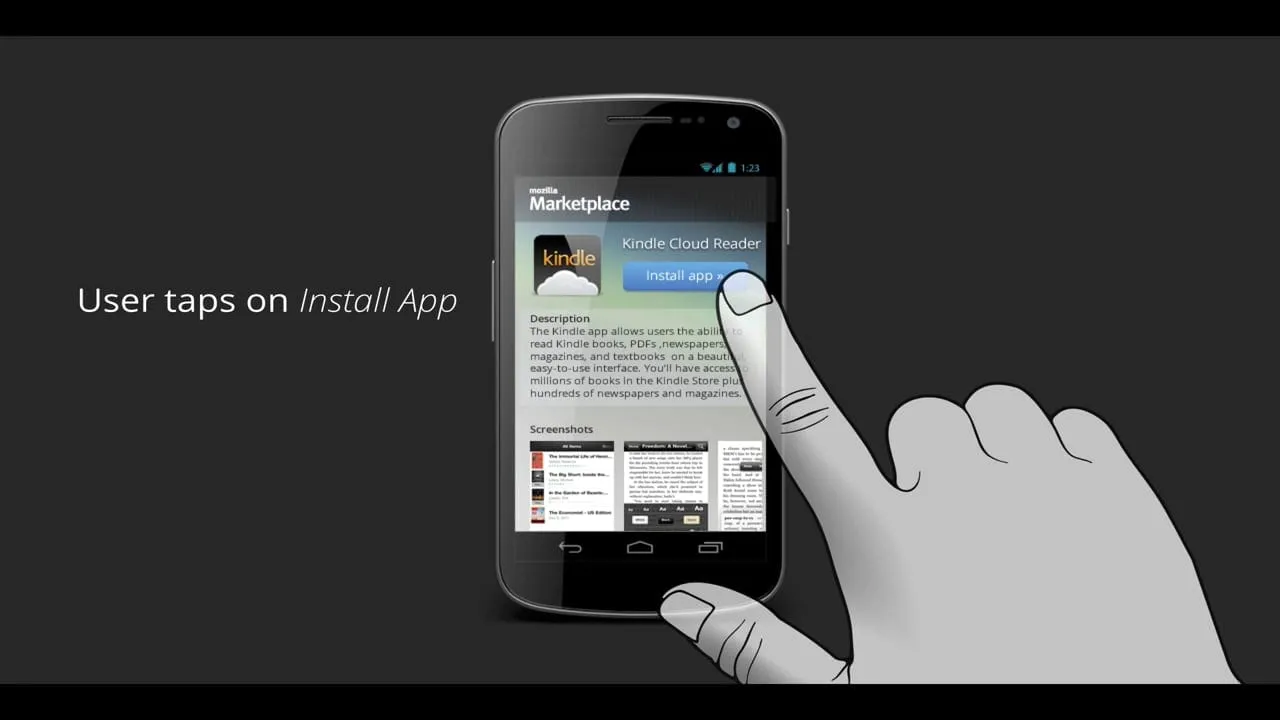
The consumer side had its own test. A person on a phone or a desktop should be able to find an app and install it in a few taps.
The approach
I led the developer-facing UX team. We started with research into how developers work, set direction in a working session, and then moved from sketches to wireframes to video prototypes.
- 01
Field research with developers
Diane Loviglio and I ran the research together and presented the highlights as a short deck on developer tools. We looked at competing stores, who the target developers were, and how an app moves from idea to launch. The tools they already used gave us the list of places our own work would have to fit.
Highlights from the developer research deck, with Diane Loviglio. - 02
Strategy session
I led a product strategy brainstorming session during a work week. We wrote the things people say when they look for an app on the whiteboard, such as wanting something for kids or wondering whether a service has an app, and drew the paths from each. Featured lists, galleries, details and collections all came out of that wall.
Product strategy brainstorming session. - 03
Sketching both sides
I sketched concepts for the developer and the consumer experience in the same notebook so the two stayed connected. The pages cover how a person shares an app with someone else, what the recipient sees on arrival, and how sign-up and install work on Android. Sketching these side by side exposed gaps in either flow quickly.
Sketching concepts for developer and consumer experiences. - 04
Wireframes for the mobile store
I moved the strongest sketches into wireframes for an open app store on mobile: a home page with a video explaining what apps are and a featured list, search with suggestions above the keyboard, an app details page and an install with progress. I kept them in grayscale so the review stayed on flow.
Wireframes: open app store for mobile. - 05
Video prototype of the install
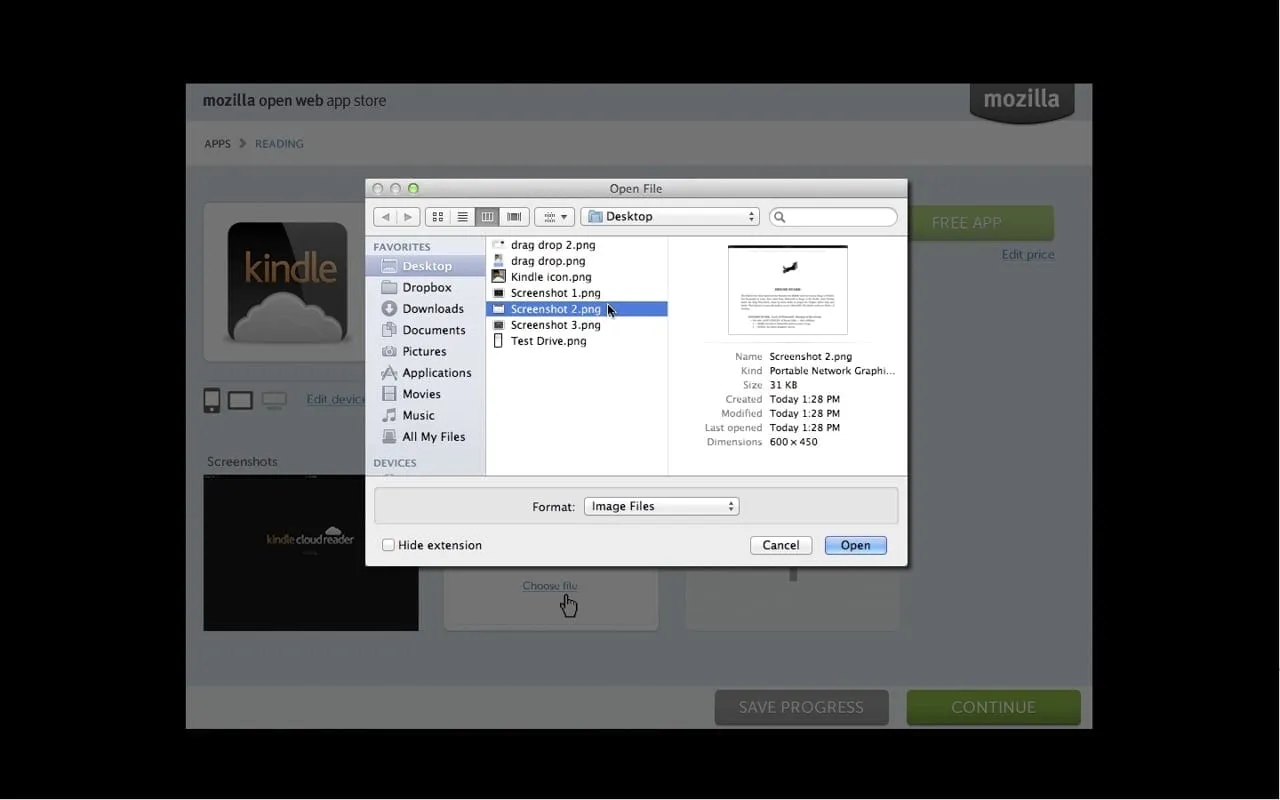
A static flow did not show the moment that mattered, so I made a video prototype of the Android install. A hand taps Install app on a details page, and each step is labeled in plain words. A second video, Test Drive, explored editing a live app store. Stakeholders could watch both in seconds.
Marketplace app details page.Mockup by Brian Dils, "Marketplace Details Page" on Flickr. Source: Flickr ↗ - 06
Final UX specification
The last piece was a specification for installing apps across devices. It walks through launching an app, discovering one in the browser toolbar or menu and installing it on a phone or a desktop. I wrote each page so an engineer could build the flow without a meeting.
Final UX specification: cross-device app installation flow.
The solution
The result was an open app store with a design for each of the audiences. Developers got the app submission flow and mobile development tools inside Firefox, along with an updated design for the Mozilla Developer Network website. Consumers got a store they could browse on a phone, with a details page and an Install app button, plus concepts for how apps live on a desktop.
The design idea was that an app should be easy to move from the web to a device. Discovery in the browser, a single install action and the same app running on different systems all pointed to that. On desktop, apps were reached from the dock and opened in their own native window.
What I delivered
- Field research presentation on developer tools
- Concept sketches for developer and consumer experiences
- Wireframes for an open app store on mobile
- Desktop app concepts
- Video prototypes of the Android install flow and Test Drive
- Cross-device app installation UX specification
See it working
Value added
For people using it
A person could find an app and install it from a clear details page, on a phone or a desktop. Apps built on open web technology ran on different operating systems and devices.
For the business
Mozilla had a store design that matched its open web position, and a submission flow for developers that gave the catalog a way to grow. Developer tools in Firefox kept builders in the browser.
For the team
Research, a strategy session and video prototypes gave product management and engineering a shared picture of the store. The specification turned that picture into pages engineers could build from.
The result
Covered the app submission flow, mobile development tools in Firefox and an updated Mozilla Developer Network design. The consumer work included wireframes for an open app store on mobile, desktop app concepts and a specification for installing apps across devices.
What I took from it
Putting the developer research and the consumer sketches in the same room kept each side honest, because a store only works if both sides can see why it helps them. I would run the strategy session earlier, since the whiteboard produced more usable structure than any document I wrote afterward.
Background
Mozilla announced its Marketplace in February 2012 as an open, device-independent app store built on web technologies. A testing version reached Firefox for Android in October 2012. The store shipped on every Firefox OS phone from the ZTE Open launch in July 2013. The Mozilla Developer Network was redesigned in December 2013. Mozilla closed the Marketplace in March 2018.